4Team Accueil Accueil | Nouvelles | Aide | Réviser Panier d'achats | Français


Acheter Maintenant
Recommander à un ami
Rapporter un Problème
Recevoir notre Lettre
d'Informations
Nous parrainer et gagner
de l'Argent
  shareo box
arrowInfo
xEssai
arrowPrix
arrow Partager et synchroniser Microsoft Outlook® sans un serveur
workgroupcalendar
Liens de Produits:
Solutions:
Partagez vos projets et dirigez votre équipe & clients
arrow orangePartager les dossiers Outlook
Envoyez/Recevoir des télécopies
Planifiez des courriels répétitifs
Download ShareO software for Microsoft Outlook
x
x
CannedResponsesversion 1.92.0027
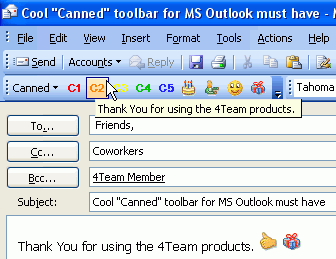
Canned text, templates, emoticons, documents integrated in the Microsoft® Outlook® email toolbar.

  Latest News
S'abonner

Attachments: Screenshots Documentation Frequently Asked Questions

CannedResponses addin integrated in Microsoft Outlook email toolbar that significantly simplifies the process of sending numerous or repetitive email. Canned text, templates, Messenger like Emoticons, attachments to make your professional personalized email response in just few clicks.

The program is very useful for help desks and busy persons and helps spend less time writing Email and shares your "canned" experience with your team.

This is a fantastic addition to current email capability and a perfect email toolbar for active email users.
Save valuable time and money using standard text and templates, and create own canned toolbar.
more screenshots...

Try CannedResponses.
Order a trial version of CannedResponses on CD or Download it Now to evaluate it for FREE. No cost, no commitment and no obligations, with Free Live Help and Support.
Buy CannedResponses Now!
Buy Now and you receive:
  • 1 year of free updates
  • 1 year of free support via e-mail and live help
  • License policy
    CannedResponses comes with a free 14 - day trial, an easy - to - install/uninstall program, with free installation help, and a 14-day moneyback guarantee*.

    *Before requesting a refund, you must request our online technical support by email or Live Help. If the problem is not resolved through our online technical support, we will give you a full refund.
    Have your order ID ready and email to: support@outlook4team.com.

    Main Features
  • The "Canned" bar will appear in any email, appointment or note toolbar for your convenience.
  • Create and modify canned (predefined): auto text/links, any attachments, templates (you need prepare all you template in word and save to .rtf file) , emoticons.
  • Add or delete any "canned" to the canned bar.
  • Organize you "canned" items to the Subfolders/Submenus.


  • Installation Instruction
    System Requirements
    CannedResponses Frequently Asked Questions (FAQ)
    Find answers to your questions about CannedResponses
    How to Buy
    Find pricing, upgrade eligibility, and purchasing options.

    Top of pageTell a Friend | Print | Add to Favorites
    Produits Associés x
    x x Produits/Services Description courte Cliquez sur le nom du produit pour en apprendre plus
    Sendlater Set a schedule for sending your e-mail messages.
    Email Responder Autoresponse to incoming e-mails, based on your Free/Busy Status...
    Reply With Templates Simplify the process of replying repetitive email messages ...
    CD des Produits 4Team Commandez tous les CD d'essai 4Team maintenant ($8.95pour chaque CD)  buyAjouter à panier d'achats

    Commentaires sur cette page web | Nouvelles | xAidex | Hautarrow
    Prix | Contactez-nous | Commentaires | Newsletter Gratuite | Devenir un Associé | Subscribe to solutions for Microsoft Outlook News Feed
    © 1999-2010 4Team Corporation. Tous droits réservés. Conditions/Confidentialité | Conçu et développé par iCOMDesigner
    Microsoft, Outlook et le logo Office sont des marques ou des marques déposées de Microsoft Corporation aux États-Unis et/ou dans d’autres pays.