|

|
 | |  |
|
| CannedResponses | version 1.92.0027 |
| Canned text, templates, emoticons, documents integrated in the Microsoft® Outlook® email toolbar. |

CannedResponses comes with a free 14 - day trial, an easy - to - install/uninstall program, with free installation help, and a 14-day moneyback guarantee*.
*Before requesting a refund, you must request our online technical support by email or Live Help. If the problem is not resolved through our online technical support, we will give you a full refund.
Have your order ID ready and email to: support@outlook4team.com. |  |
 |
Main Features
The "Canned" bar will appear in any email, appointment or note toolbar for your convenience.
Create and modify canned (predefined): auto text/links, any attachments, templates (you need prepare all you template in word and save to .rtf file) , emoticons.
Add or delete any "canned" to the canned bar.
Organize you "canned" items to the Subfolders/Submenus.
|
| |
 | |  |
|

 Home
Home



 Screenshots
 Documentation
 Frequently Asked Questions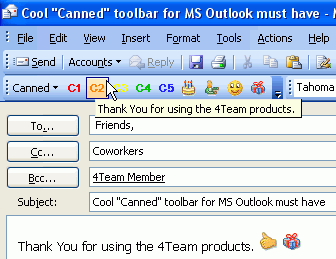
 Save valuable time and money using standard text and templates, and create own canned toolbar.
 more screenshots...

 Top of page
 Tell a Friend
 Print
Print Add to Favorites


 Add to Cart
